
Multi-Zone Fulfillment: What Warehouse Software Do You Need?
The warehouse software that handles complex multi-zone order fulfillment is a warehouse execution system (WES), not a basic warehouse control system (WCS) and not a WMS working alone. A WES sees every zone at once, sequences work by order instead of by zone, and rebalances the floor the moment one area falls behind. The rest of this guide is about telling the real thing from a good demo.
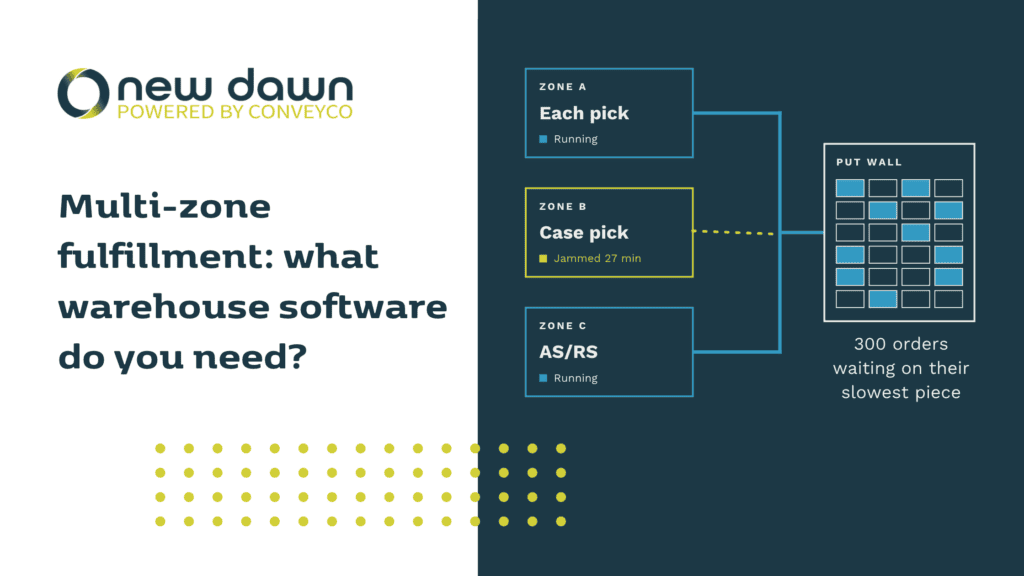
You may already know the scene. It is 2:40 on a Thursday afternoon. Your each-pick zone is humming. Your case-pick zone is stuck behind a jam nobody has cleared yet. Meanwhile 300 orders that need items from both are sitting at consolidation with half their contents, and the carrier arrives at 4:30. Every system on the floor is doing exactly what it was told to do. Those orders are still going to miss the truck.
That is the multi-zone problem in one afternoon, and it is why software that runs one zone well does not automatically run three.
The short version
- Multi-zone fulfillment is hard because orders cross zones, not because zones are hard. The work is keeping the pieces of each order in step.
- Look for four things: order-level visibility across zones, real-time rebalancing, cutoff-aware priority, and equipment-neutral integration.
- Four kinds of software compete for the job: OEM-bundled controls, WMS execution modules, independent WES platforms, and custom middleware. Each fits a different floor.
- Test any vendor with your own order data and one forced bottleneck. The eight questions below will tell you most of what you need to know.
- Honest caveat: if you run two mostly manual zones, a good WMS and a basic WCS may be all you need.
What does “multi-zone fulfillment” actually mean?
A zone is an area of your distribution center with its own equipment, labor model, and pace. Think each-pick modules, case pick, an AS/RS aisle, a goods-to-person station, a returns area, or pack-out.
Multi-zone fulfillment means a single customer order draws items from more than one of them. A six-line order might need two items from an AS/RS tote, three from the each-pick mezzanine, and one case from bulk. Those pieces have to land at consolidation (a put wall, a sorter, a pack station) close enough together that nobody is holding a tote and waiting.
Zones usually either pick in parallel and consolidate downstream, or pass the order along from zone to zone. Either way, the system has to answer a question no single zone can answer on its own: when should this zone release its piece so it arrives with the others?
Why single-zone logic breaks when you add zones
Most control software was designed around one question: how do I keep this equipment moving? That is a great question for a sorter. It is a poor one for a building.
One zone idles while another drowns
Zone A finishes its queue and goes quiet. Zone B is backed up with work zone A could have absorbed. Nothing in the software notices, because each zone only reports on itself. A supervisor spots it eventually, usually after the backlog has already cost you.
Orders sit waiting on their slowest piece
An order is only as fast as its slowest line. While a late item makes its way through one zone, the rest of that order occupies a tote, a put wall slot, or a pack station. Multiply that by a few hundred orders and the building looks busy while throughput quietly drops.
Priority gets lost at the zone boundary
Zones tend to work their own queues first in, first out. Cutoffs belong to the order, not the zone. The order that matters most is the one whose slowest piece is furthest behind, and no single zone can see that.
A restaurant kitchen has the same shape. Grill, fry, and garnish can each be excellent and the table still gets cold food, because nobody called the plate. In a kitchen, the expediter does that job. In a multi-zone DC, it is the software above the zones.
What multi-zone fulfillment software has to do
Skip the feature checklist for a minute. These are the seven jobs that separate software that coordinates zones from software that reports on them:
- See the order, not just the task. It tracks each line and container until the whole order is complete, across every zone it touches.
- Release work so pieces arrive together. Instead of flooding consolidation with whatever finished first, it times releases so an order’s pieces converge.
- Rebalance in real time. When a zone falls behind, it moves eligible work, labor, or inventory to where there is capacity, without waiting for someone to notice. (This depends on stock and equipment being available in the alternate zone, which is why inventory visibility matters.)
- Prioritize by cutoff and service level. Priority follows the order and the carrier clock, not the zone queue.
- Track inventory inside the automation. Knowing what went in and what came out is not enough. You need to know where it is in between. We covered that visibility gap in WES vs. WMS.
- Handle exceptions without a babysitter. Short picks, jams, and offline equipment get rerouted automatically, and a human hears about it only when a human is actually needed.
- Talk to everything. Real multi-zone floors mix vendors. The software has to coordinate all of it, not just the equipment it shipped with. Our piece on robot interoperability shows how fast mixed fleets become the norm.
Four kinds of software that claim this job
When buyers ask which warehouse control system handles multi-zone fulfillment, they are usually choosing between these four categories, whether or not the vendor uses these labels.
| Category | What it is | Where it shines | Where it falls short across zones | Best fit |
|---|---|---|---|---|
| OEM-bundled controls | Software sold with one equipment system, such as a sorter, AS/RS, or AMR fleet | Tight control of that machine, quick to commission | Sees only its own equipment. It cannot move work between zones run by different vendors. | One dominant automation system with simple surroundings |
| WMS execution modules | Wave and task management built into the warehouse management system | One vendor, shared data, familiar to your team | Built around records and batch releases, with limited visibility inside the automation | Mostly manual zones with light automation |
| Independent WES | An execution layer that sits between your WMS and your equipment (New Dawn WES is in this category) | Orchestrates mixed equipment, reprioritizes in real time, tracks inventory inside automation | Requires an integration project and a partner who understands your floor | Two or more automated zones, mixed vendors, tight cutoffs |
| Custom middleware | Logic built in-house or by a consultant | Fits your quirks exactly | Depends on a few people, hard to maintain, and you are rebuilding what already exists | Rare, highly specialized flows |
We build New Dawn, so our bias is obvious. Judge category fit on your floor, not on our say-so.
Eight questions to ask before you shortlist anyone
- “Show me what happens when zone A finishes early and zone B is backed up.” A good answer: the system shifts work on its own, and you can watch it happen.
- “How do you decide which order to release next across zones?” A good answer: by cutoff and order completion, not by whichever zone has the shortest queue.
- “What do you track once inventory goes inside our automation?” A good answer: item and container location the whole way through, not just at entry and exit.
- “Which equipment vendors have you already integrated, and how?” A good answer: names and protocols. “We integrate with anything” is not an answer.
- “How do you connect to our WMS, and does it need to change?” A good answer: it uses the protocol your WMS already speaks, requires no WMS modification, and can be tested well before go-live.
- “What happens when a conveyor goes down mid-shift?” A good answer: work reroutes or holds, and the alert tells your team what to do about it.
- “Can we add a zone later without starting over?” A good answer: yes, because the system is modular.
- “Can we test with our own order data?” A good answer: yes, through simulation or a phased pilot. A demo built on someone else’s orders proves very little.
Four red flags in a demo: only per-zone dashboards and no order-level view, rebalancing that requires a supervisor to reassign work by hand, a demo layout with a single zone, and no clear answer on testing with your data.
Where New Dawn WES fits
New Dawn is Conveyco’s proprietary warehouse execution software, built in-house and running in multiple live facilities across retail, e-commerce, food and beverage, cold chain, and parts distribution. Because Conveyco designs both the software and the physical automation, the two are built to work as one system.
For multi-zone floors, a few things matter most:
- It is hardware-agnostic. New Dawn coordinates AS/RS, conveyors, sorters, shuttles, and robotics from different manufacturers as one operation.
- It works with the WMS you have. It connects over FTP, APIs, TCP/IP, web services, or direct database access, with no changes to your WMS. See how that plays out in our guide to warehouse execution systems for ecommerce.
- It is modular. You can start with the zone or function that hurts most and expand, rather than committing to a rip-and-replace.
- It prioritizes and balances work across zones, people, and machines as conditions change. Our post on orchestrating workflows within your distribution center goes deeper on how that works.
On integrated deployments, Conveyco has documented up to 99.9% inventory accuracy, 20 to 30% gains in picking efficiency, and up to 25% shorter cycle times. Your results will depend on your operation, which is exactly why we start with the RightFit methodology instead of a price sheet.
Do you actually need a WES?
Maybe not. If you run one or two mostly manual zones, a modern WMS with wave management and a solid WCS on your sorter can carry you a long way. Adding more software than the floor needs is its own kind of waste.
Signs you have outgrown that setup:
- Your zones belong to different automation vendors and none of their software talks to the others.
- Orders regularly sit at consolidation waiting on stragglers.
- Bottlenecks keep moving around the building, and overtime is how you clear them.
- Supervisors spend their shifts shuffling work between zones by hand.
- You are adding automation to a live building and cannot afford downtime. (Our guide to upgrading without shutting down covers that.)
- Peak season exposes missed carrier cutoffs even when you have the inventory.
If that list sounds familiar and you run a mid-sized operation, our post on warehouse execution systems for mid-sized distribution centers is a good next read.
Frequently asked questions
Which warehouse control system handles complex multi-zone order fulfillment?
A warehouse execution system (WES) handles it best. A traditional WCS controls equipment such as conveyors, diverters, and sorters. A WES sits above it and decides what work is released where and when, across every zone and every vendor’s equipment. For multi-zone floors, look for order-level visibility, real-time rebalancing, and cutoff-aware prioritization.
What is the difference between a WCS and a WES for multi-zone operations?
A WCS runs the machines in real time. A WES coordinates the work across all of them. If your zones run on different equipment, a WCS can only manage what it is connected to, while a WES manages the flow between them. For more background, read what a warehouse control system is and how it evolved into WES.
Do I need to replace my WMS to coordinate multiple zones?
No. A WES works alongside your WMS. The WMS keeps handling orders, inventory records, and enterprise data, while the WES handles execution on the floor. New Dawn connects to your existing WMS without modifying it.
Can software rebalance work between zones automatically?
Yes, when it has three things: order-level visibility, awareness of where inventory sits, and control over how work is released. There are practical limits. The stock has to exist in the alternate zone, and the equipment there has to be able to take the work.
How long does a multi-zone WES implementation take?
It depends on the number of zones, the equipment involved, and your WMS. Two things help. WMS integration can be tested and proven months before go-live, and a phased rollout zone by zone limits risk to the live operation.
How much does multi-zone fulfillment software cost?
It varies widely with scope, equipment, and integration depth, so any number quoted before someone has seen your floor is a guess. Treat cost as one input to a payback model. Our breakdown of warehouse automation ROI by facility size is a useful place to start.
Talk through your zones with us
If you are weighing options for a distribution center with more than one zone, we are glad to walk through your floor with you and tell you plainly whether a WES is the right move. Talk to the Conveyco team or see how New Dawn WES works in practice.
